Basic features
This page contains an introduction to the basic features of ETJump.
Under construction
This page is a work in progress. The old “Getting Started” page was split into three separate pages without much of new content. This will be filled with more information in the future.
Position saving and loading
ETJump offers players to ability to save and load their position. It’s recommended to bind these keys to conveniently available buttons, such as mouse4/5 or q/e for easy access, as you will be needing them often.
By default when you load a saved position, your viewangles are restored to match the angles you had when saving. Some players find this distracting, and it can be turned off by setting the etj_loadviewangles cvar to 0.
Tip
Saves are unique per team. A saved position created while playing on Allies cannot be loaded while playing on Axis.
Tip
There are 3 different saveslots available for each team, which can be accessed by typing save/load 0/1/2. By default, slot 0 is used.
Speed meter
ETJump offers you two different speed meters to see how fast you’re going. These are both visible by default.


Both of the speed meters have several customization options.
etj_drawspeed
etj_drawSpeed2
Tip
It’s also possible to display your momentary max speed. Refer to etj_drawMaxSpeed.
Hiding & drawing other players
Collision with other players is disabled in ETJump by default. Because of this, it’s often desired to hide other players, to prevent them from blocking your view. This is enabled by default, and can be toggled with the etj_hide cvar.
Tip
If you don’t want other players to see you even when player hiding is disabled, you can enable the etj_hideMe cvar.
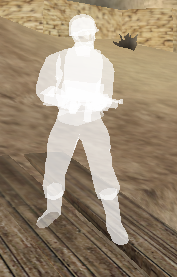
It’s also possible to draw other players using a simple, single colored shader by enabling the etj_drawSimplePlayers cvar.
Pressed keys view
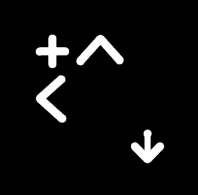
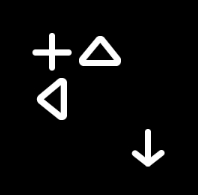
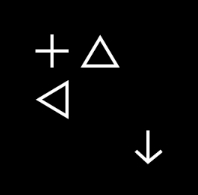
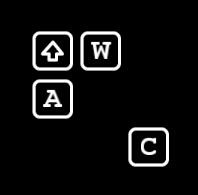
You can see what movement keys you are pressing by enabling etj_drawKeys. This also works while spectating other players, which is a great way for new players to learn some of the more advanced techniques from more experienced players. You can choose one from the following keysets.
Keyset |
Value |
|---|---|
|
|
|
|
|
|
|
|
|
|

Teleporting (to) other players
You can teleport to a location of another player on the server by using the goto command. Similarly, you can teleport other players to your location using the call command.
Chat features
The chat in ETJump offers a lot of new features. You can add timestamps to chat messages, expand it to show more than 8 messages, change the size and position and move it around freely.
The chat also supports a mentioning systen. You can tag players by typing a part of their name inside at signs, e.g. @name@. This marks the chat message for the tagged client and plays a notification sound.
THe full list of customization available is the following.
Private messages
You can send private messages to other players by typing /m <name|clientnum> <message> in the console.
Note
Private messages are sent to all players who’s name match <name> partially. If you want to make sure you’re only sending the message to a single client, it’s safer to use <clientnum>.
If playing with ET: Legacy client, you can enable window flashing for incoming private messages if the game is minimized by setting the bit 2 on etj_highlight.
Fireteams
Fireteams in ETJump are team-agnostic, meaning there are no restrictions on which team the members of the fireteam are allowed to be in. Fireteams provide additional functionality to the gameplay by allowing players to enable features only for the members of the fireteam.
Rules
Fireteam members can set “rules” amongst themselves. The available rules are following:
noghost- fireteam members can toggle player collision between the members.savelimit- fireteam members can limit the number ofsavecommands each member is allowed to use.
Teamjump mode
When teamjump mode is enabled, target_ftrelay entity activates targets for each of the fireteam members.
See also
HUD drawing
A lot of the standard HUD elements are not important while playing ETJump, and can be hidden with the following cvars.
Portal gun
ETJump includes a portalgun for players to use. It can be found in weaponbank 9. Firing the secondary portal is done with +attack2 instead of weapalt.
Tip
To ease the portalgun usage, you can use etj_autoPortalBinds cvar.
Note
Depending on the map and server settings, portalgun might be disabled, as it’s quite exploitable on a lot of maps.